Service Desk Kiosk
An iPad on the IT desk. You say who you are, what you need and who helped you, and the ticket is created and assigned in the background. No more help that never gets logged.
- Status
- In use at Adyen
- Runs on
- iPad + admin on desktop
- Built with
- React, FastAPI (Python), LDAP, Zammad API, Slack API, Leaflet

The problem it solves
Help at the desk often went unlogged, and nobody could see how busy each office really was. I set up a service desk in every Adyen office worldwide: an iPad with a web app where you create a ticket in three taps. It goes automatically to the right IT support engineer in the ticketing system. It also logs the accessories we hand out, and management sees how busy each office is and how much work IT does.
What I built
- A ticket in three taps, assigned to the right person
- Ticket counts and handed-out accessories at a glance
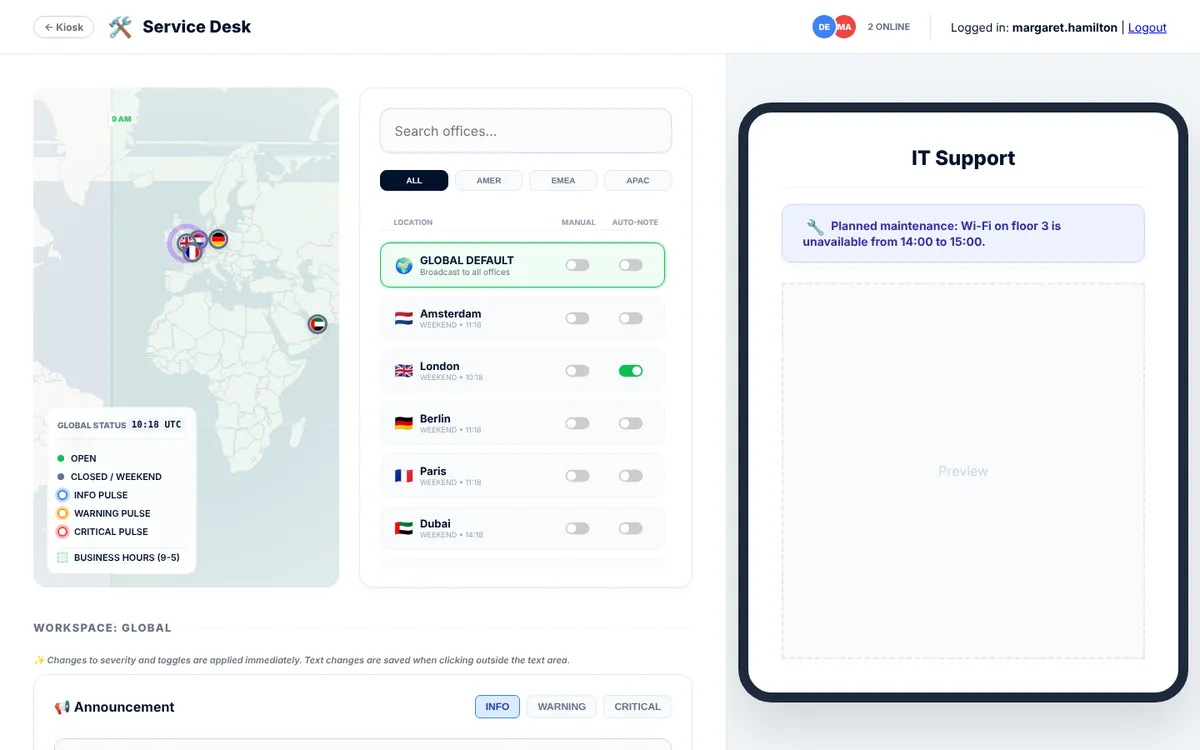
- Post notices on the iPad and see desk hours worldwide
Result
In use in 10 offices. Every accessory and every visit to the desk is now logged, so management finally sees how busy each office is and how many people it needs, especially in the remote offices.
How I built it
Before the kiosk, a ticket for an accessory or on-site help had to be created by hand after the visit. That almost never happened, or it was forgotten. So the desk’s real work was invisible.
The kiosk had to be faster than saying “never mind”: who are you, who helped you, what was it, done. It’s a React app on an iPad with a small FastAPI backend that looks people up in LDAP, creates the ticket and posts to Slack. The admin panel pushes notices to every iPad and shows the desk hours of every office, so you can see whether another office is already awake and at work.
The hardest part was getting the iPads, set up the way they were, to reach our internal tools. I used AI to write much of the code and tested everything on real iPads at the desk.
Try it like this
- On the iPad screen, say who you are and who helped you.
- Pick what you needed and click “Submit Ticket”.
- Then open “Admin panel” and choose “Continue as Margaret Hamilton (admin)” to see counts, notices and desk hours.