Pulse
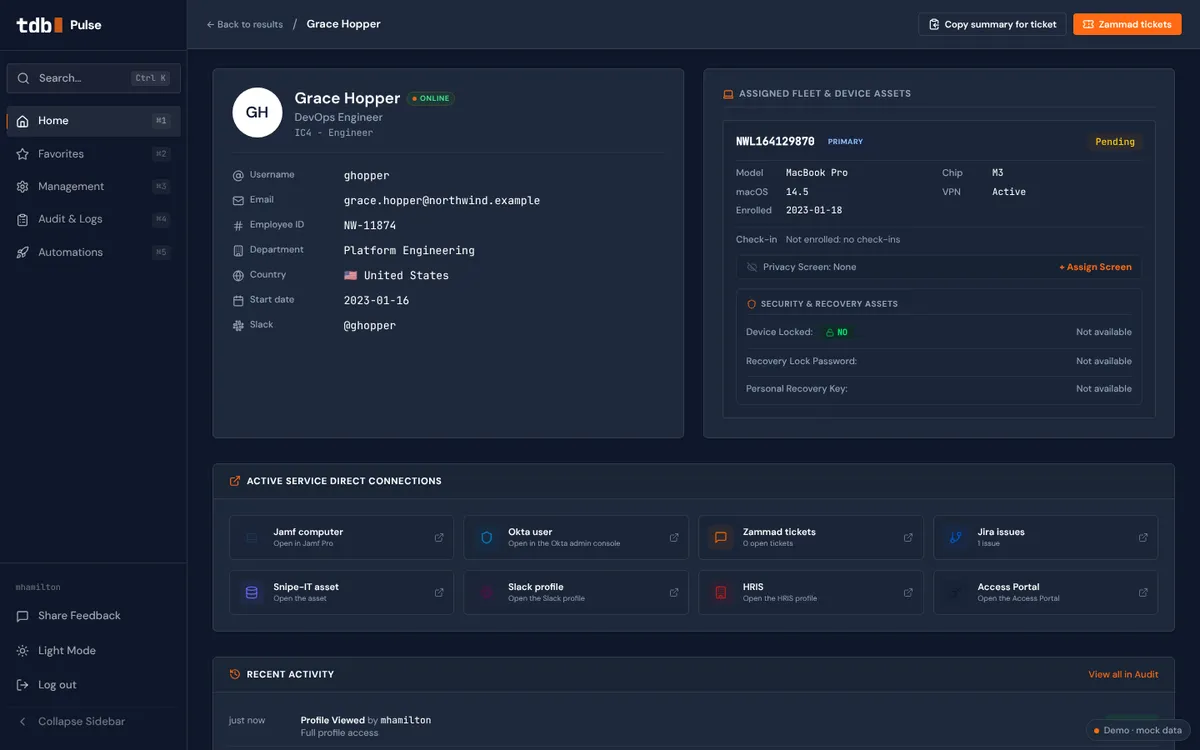
Everything an IT support engineer needs, behind one search box. Pulse talks to all the other systems, so you stop logging in to five tools and copy-pasting between them.
- Status
- In development at Adyen
- Runs on
- Desktop
- Built with
- React, TypeScript, Vite, Tailwind

The problem it solves
To help one person, IT support logs in to four or five tools: look them up here, check their laptop there, copy something over, paste it somewhere else. Pulse puts all of it in one field. I’m building it at Adyen, next to my daily tickets. If it works, it opens up to every employee, in Slack or a web app, so people can find and fix their own problem.
What I built
- Look someone up and see their devices and access
- Ask the built-in AI who has access to what, and why
- Run scripts, add people to groups and push policies in one click
Result
Still in development. The goal: less time, less effort and less searching for every IT question.
How I built it
Every IT question started the same way: log in to Jamf, then Okta, then the ticketing system, and copy things between them. I wanted one search box that already knows the answer.
Pulse is a React and TypeScript front end that talks to the systems we already use through their APIs, so nothing is copied and there is nothing new to maintain. The hard part isn’t the screen but the rights: support may see a lot, but not everything, so every action checks who you are first and is written to an audit log.
I write most of the code together with AI. I decide what it should do, I read every change, and nothing goes live before it has been tested and approved under the company’s rules.
Try it like this
- Type “Grace” in the search field and open her profile.
- Look at her laptop, groups and access in one view.
- Click “Ask Pulse” and ask who has access to what, or run an action.