Onboarding Guide
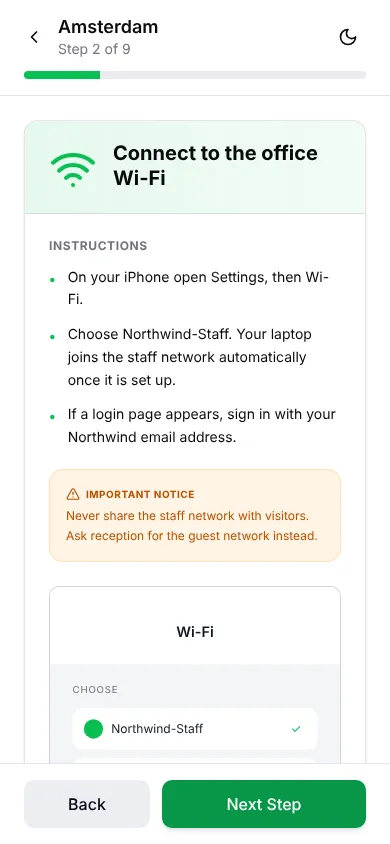
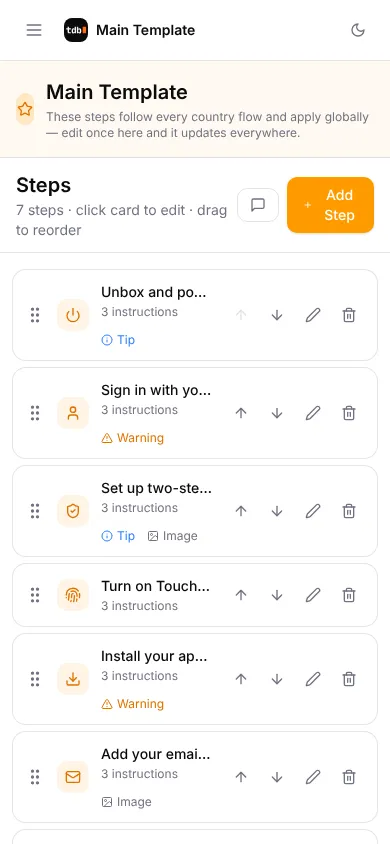
New joiners follow this guide on their own iPhone while they set up their new laptop. IT changes the steps per office in the admin console.
- Status
- In use at Adyen
- Runs on
- iPhone + admin console
- Built with
- React, Vite, Netlify Functions

The problem it solves
On day one a new joiner has a new laptop and a lot of questions. The Guide runs on their own phone, so they can read the next step while the laptop is open in front of them. It is the day-one half of onboarding: the Portal runs everything behind it.
What I built
- Pick your office and follow short steps with tips and screenshots
- Picks up where you left off, in light or dark mode
- Admin console for offices, steps and icons, with backup and restore
Result
Used in every office worldwide, by every new joiner, in the first part of onboarding.
How I built it
On day one, a new laptop can’t show you how to set up that same laptop, and the Portal only works once it’s set up. So the Guide runs on the new joiner’s own phone, next to the laptop, for that first part.
You pick your office and follow short steps with a tip, a warning and a screenshot where it helps, and it remembers where you were. An admin console lets IT change offices, steps and icons without me, with backup and restore.
It’s a small React app with a tiny serverless backend, so there’s almost nothing to maintain. The Guide gets the laptop ready; the Portal takes over from there.
Try it like this
- Pick an office on the first screen.
- Follow a few steps, then close it and open it again: it remembers where you were.
- Click “Admin console →” to see how steps are edited.